> ## Documentation Index
> Fetch the complete documentation index at: https://veniceai-docs-web3-key-siwe-challenge.mintlify.site/llms.txt
> Use this file to discover all available pages before exploring further.
# Autonomous Agent API Key Creation
> Mint a Venice API key autonomously from an on-chain AI agent by staking VVV on Base and signing a Venice-issued SIWE challenge with a wallet.
An AI agent that controls a wallet on Base can mint its own Venice API key with no human in the loop. The agent acquires VVV, stakes it, requests a short-lived challenge bound to its wallet address, signs that challenge, and posts it back to receive a fresh API key tied to the staking wallet.
This guide walks through the full flow end to end and covers the funding options for actually paying for inference once the key is minted.
## Prerequisites
* An EVM wallet on Base controlled by the agent (private key in an env var or secret manager).
* A small amount of ETH on Base for gas (staking is two transactions: `approve` then `stake`).
* Any non-zero amount of VVV to stake. The minting endpoint requires only that the wallet has a non-zero sVVV balance, so 1 VVV is enough to mint a key. See [Paying for inference](#paying-for-inference) for what you need to actually call paid endpoints.
Use a dedicated agent wallet rather than a treasury wallet. The wallet's private key signs every Venice challenge, so its blast radius should be small.
## Steps
Send VVV to the agent's wallet, or have the agent swap on a DEX such as [Aerodrome](https://aerodrome.finance/swap?from=eth\&to=0xacfe6019ed1a7dc6f7b508c02d1b04ec88cc21bf\&chain0=8453\&chain1=8453) or [Uniswap](https://app.uniswap.org/swap?chain=base\&inputCurrency=NATIVE\&outputCurrency=0xacfe6019ed1a7dc6f7b508c02d1b04ec88cc21bf).
VVV token contract on Base: `0xacfE6019Ed1A7Dc6f7B508C02d1b04ec88cC21bf`
Stake the VVV in the [Venice Staking Smart Contract](https://basescan.org/address/0x321b7ff75154472b18edb199033ff4d116f340ff#code) at `0x321b7ff75154472B18EDb199033fF4D116F340Ff`. This is two transactions:
1. `approve(spender, amount)` on the VVV token, where `spender` is the staking contract.
2. `stake(amount)` on the staking contract.
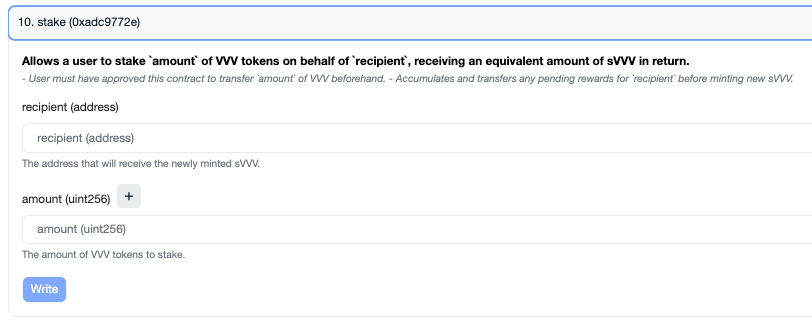 When the second transaction confirms, the wallet's VVV balance decreases and its sVVV balance increases by the same amount. The minting endpoint reads the sVVV balance to confirm the wallet is staked.
Call `GET /api/v1/api_keys/generate_web3_key?address=` to get a short-lived [EIP-4361](https://eips.ethereum.org/EIPS/eip-4361) (Sign-In with Ethereum) challenge. The endpoint is unauthenticated, but the challenge is bound to the address you pass and can only be redeemed by that wallet.
```bash theme={null}
curl --request GET \
--url 'https://api.venice.ai/api/v1/api_keys/generate_web3_key?address='
```
The response contains `message`, `nonce`, and `expiresAt`:
```json theme={null}
{
"data": {
"message": "api.venice.ai wants you to sign in with your Ethereum account:\n0x...\n\nAuthorize Venice API key creation. Only sign this on venice.ai — anyone holding this signature can create an API key on your Venice account.\n\nURI: https://api.venice.ai/api/v1/api_keys/generate_web3_key\nVersion: 1\nChain ID: 8453\nNonce: 9f2c1d6b4a8e05337c1b9d2e6f4a7c81\nIssued At: 2026-06-30T11:02:41.167Z\nExpiration Time: 2026-06-30T11:17:41.167Z\nResources:\n- urn:venice:api-key:create",
"nonce": "9f2c1d6b4a8e05337c1b9d2e6f4a7c81",
"expiresAt": "2026-06-30T11:17:41.167Z"
},
"success": true
}
```
The challenge expires 15 minutes after issuance and is **single-use** — it is consumed the first time a key is minted with it. Request a new one for every key.
Sign the `message` string verbatim with the wallet that holds the staked VVV. This is a standard `personal_sign`. Both `ethers.Wallet.signMessage(message)` and `viem`'s `account.signMessage({ message })` produce the correct signature.
Do not reformat, re-wrap, or regenerate the message. Venice verifies the signature over the exact bytes it issued, and independently re-checks the `domain`, `URI`, `Chain ID`, statement, and address inside it.
`POST` the address, signature, and message to the same endpoint, along with the type of key you want.
```bash theme={null}
curl --request POST \
--url https://api.venice.ai/api/v1/api_keys/generate_web3_key \
--header 'Content-Type: application/json' \
--data '{
"address": "",
"signature": "",
"message": "",
"apiKeyType": "INFERENCE",
"description": "Agent key minted on "
}'
```
Required fields: `address`, `signature`, `message`, `apiKeyType` (`INFERENCE` or `ADMIN`).
Optional fields: `description`, `expiresAt`, `consumptionLimit` (caps total spend on this key, denominated in `usd`, `vcu`, or `diem`).
On success the response contains the minted `apiKey` string. Store it in the agent's secret store and use it as a normal Bearer token (`Authorization: Bearer `).
## End-to-end example
The example below uses a real wallet from an environment variable rather than a randomly generated one. A random wallet has no staked VVV and the mint will be rejected with the `Wallet has no staked VVV on Base` error.
```typescript theme={null}
import { ethers } from "ethers"
const wallet = new ethers.Wallet(process.env.WALLET_PRIVATE_KEY!)
const address = wallet.address
const challengeResponse = await fetch(
`https://api.venice.ai/api/v1/api_keys/generate_web3_key?address=${address}`,
)
const { data: { message } } = await challengeResponse.json()
const signature = await wallet.signMessage(message)
const mintResponse = await fetch("https://api.venice.ai/api/v1/api_keys/generate_web3_key", {
method: "POST",
headers: { "Content-Type": "application/json" },
body: JSON.stringify({
address,
signature,
message,
apiKeyType: "INFERENCE",
description: "Agent key",
}),
})
const result = await mintResponse.json()
if (!mintResponse.ok) {
throw new Error(`Mint failed: ${result.error}`)
}
console.log("Minted key:", result.data.apiKey)
```
## Error reference
The endpoint returns specific, actionable error messages. Map these in the agent so it can decide whether to retry, request a new token, or stop.
| Status | Error message contains | What it means | What to do |
| ------ | ---------------------------------------------------- | ---------------------------------------------------------------------------- | ---------------------------------------------------------------------- |
| `400` | `Invalid wallet address` | The `address` field is not a valid EVM address. | Fix the address and resubmit. |
| `400` | `The challenge has expired` | The challenge expired before you signed and submitted it. | Request a new challenge, sign it, and submit immediately. |
| `400` | `This challenge has already been used` | The challenge was already redeemed. Each one mints at most one key. | Request a new challenge for every key you mint. |
| `400` | `issued for a different wallet address` | The `address` you submitted is not the address the challenge was issued for. | Request a challenge with `?address=` set to the wallet that will sign. |
| `400` | `not a valid Venice API key authorization challenge` | The `message` is not a Venice challenge, or was modified. | Send the exact `message` string returned by the `GET` endpoint. |
| `400` | `The challenge statement was modified` | The statement line was altered after issuance. | Sign the message verbatim. |
| `400` | `The challenge domain must be "api.venice.ai"` | The `domain` line was altered. | Sign the message verbatim. |
| `400` | `Wallet signature does not match` | The `signature` does not match the `address` for the given `message`. | Sign the exact message with the wallet that owns `address`. |
| `400` | `Could not verify wallet signature` | RPC call to verify the signature failed (transient). | Retry with backoff. |
| `400` | `Wallet has no staked VVV on Base` | The wallet has zero sVVV balance. | Stake VVV first, then retry. |
## Why the challenge is wallet-bound and single-use
The challenge is a human-readable EIP-4361 message rather than an opaque token, and it carries three protections that matter if a wallet is ever prompted to sign one outside your own agent:
* **Address binding.** The challenge names the wallet it was issued for. A challenge obtained by one party cannot be signed and redeemed by a different wallet.
* **Single-use nonce.** Venice tracks the nonce server-side and consumes it on the first successful mint. One signature mints exactly one key, so a captured signature cannot be replayed for additional keys.
* **Readable statement.** The message states plainly that signing authorizes Venice API key creation, so a wallet UI such as MetaMask shows the signer what they are approving instead of a binary blob.
Treat a signature over this message as equivalent to handing over API key creation rights on your Venice account. Only sign a challenge whose `domain` line reads `api.venice.ai` and whose statement names Venice API key creation. An `ADMIN` key can create and delete other keys and spend from your DIEM, bundled credits, and USD balance.
## Paying for inference
Minting a key and being able to call paid endpoints with it are two separate things. A freshly minted key authenticates correctly but cannot call paid endpoints (such as `/chat/completions`) until the wallet's account has a spendable balance.
The minted key can spend from the user account in this priority order: DIEM, then bundled credits, then USD.
| Funding source | Autonomous? | How |
| -------------------------------- | ------------ | -------------------------------------------------------------------------------------------------------------------------------------------------------------------------------------------------------------------------------------------------- |
| **DIEM from VVV staking** | Yes | The wallet's daily DIEM allocation is proportional to its share of the staking pool. The account needs at least 0.1 staked DIEM for any DIEM to be spendable. Larger stakes earn proportionally more daily DIEM, refreshed each epoch (00:00 UTC). |
| **USD via Stripe** | No (browser) | Sign into venice.ai with the same wallet (Sign-In-With-Ethereum). The dashboard finds the existing user record. Add credits in Settings, API. |
| **Coinbase crypto subscription** | No (browser) | Same wallet sign-in, then subscribe through the dashboard. The flow redirects to Coinbase Commerce for the actual payment, so it cannot be driven from a script. |
| **Coinbase onramp** | No (browser) | Same wallet sign-in, then use the onramp widget in the dashboard. Hosted on Coinbase's UI. |
If the agent needs a fully crypto-native, headless funding path, the cleanest options are:
1. **Stake more VVV** so the daily DIEM allocation covers the agent's spend. The minted key picks this up automatically.
2. **Use the [x402 wallet flow](/guides/integrations/x402-venice-api) instead of the API key.** With x402 the agent signs a Sign-In-With-X message per request, tops up directly with USDC on Base or Solana via `POST /api/v1/x402/top-up`, and pays per request. The x402 USDC balance is wallet-bound, not user-bound, so it does not show up as balance for the minted Bearer key, but it does let the same wallet pay for inference programmatically.
## Related resources
Use Venice as both the model provider and the blockchain RPC layer for autonomous agents.
Pay per request with USDC on Base or Solana, no API key required.
Endpoint reference for the mint endpoint.
For users who prefer to mint a key from the dashboard.
When the second transaction confirms, the wallet's VVV balance decreases and its sVVV balance increases by the same amount. The minting endpoint reads the sVVV balance to confirm the wallet is staked.
Call `GET /api/v1/api_keys/generate_web3_key?address=` to get a short-lived [EIP-4361](https://eips.ethereum.org/EIPS/eip-4361) (Sign-In with Ethereum) challenge. The endpoint is unauthenticated, but the challenge is bound to the address you pass and can only be redeemed by that wallet.
```bash theme={null}
curl --request GET \
--url 'https://api.venice.ai/api/v1/api_keys/generate_web3_key?address='
```
The response contains `message`, `nonce`, and `expiresAt`:
```json theme={null}
{
"data": {
"message": "api.venice.ai wants you to sign in with your Ethereum account:\n0x...\n\nAuthorize Venice API key creation. Only sign this on venice.ai — anyone holding this signature can create an API key on your Venice account.\n\nURI: https://api.venice.ai/api/v1/api_keys/generate_web3_key\nVersion: 1\nChain ID: 8453\nNonce: 9f2c1d6b4a8e05337c1b9d2e6f4a7c81\nIssued At: 2026-06-30T11:02:41.167Z\nExpiration Time: 2026-06-30T11:17:41.167Z\nResources:\n- urn:venice:api-key:create",
"nonce": "9f2c1d6b4a8e05337c1b9d2e6f4a7c81",
"expiresAt": "2026-06-30T11:17:41.167Z"
},
"success": true
}
```
The challenge expires 15 minutes after issuance and is **single-use** — it is consumed the first time a key is minted with it. Request a new one for every key.
Sign the `message` string verbatim with the wallet that holds the staked VVV. This is a standard `personal_sign`. Both `ethers.Wallet.signMessage(message)` and `viem`'s `account.signMessage({ message })` produce the correct signature.
Do not reformat, re-wrap, or regenerate the message. Venice verifies the signature over the exact bytes it issued, and independently re-checks the `domain`, `URI`, `Chain ID`, statement, and address inside it.
`POST` the address, signature, and message to the same endpoint, along with the type of key you want.
```bash theme={null}
curl --request POST \
--url https://api.venice.ai/api/v1/api_keys/generate_web3_key \
--header 'Content-Type: application/json' \
--data '{
"address": "",
"signature": "",
"message": "",
"apiKeyType": "INFERENCE",
"description": "Agent key minted on "
}'
```
Required fields: `address`, `signature`, `message`, `apiKeyType` (`INFERENCE` or `ADMIN`).
Optional fields: `description`, `expiresAt`, `consumptionLimit` (caps total spend on this key, denominated in `usd`, `vcu`, or `diem`).
On success the response contains the minted `apiKey` string. Store it in the agent's secret store and use it as a normal Bearer token (`Authorization: Bearer `).
## End-to-end example
The example below uses a real wallet from an environment variable rather than a randomly generated one. A random wallet has no staked VVV and the mint will be rejected with the `Wallet has no staked VVV on Base` error.
```typescript theme={null}
import { ethers } from "ethers"
const wallet = new ethers.Wallet(process.env.WALLET_PRIVATE_KEY!)
const address = wallet.address
const challengeResponse = await fetch(
`https://api.venice.ai/api/v1/api_keys/generate_web3_key?address=${address}`,
)
const { data: { message } } = await challengeResponse.json()
const signature = await wallet.signMessage(message)
const mintResponse = await fetch("https://api.venice.ai/api/v1/api_keys/generate_web3_key", {
method: "POST",
headers: { "Content-Type": "application/json" },
body: JSON.stringify({
address,
signature,
message,
apiKeyType: "INFERENCE",
description: "Agent key",
}),
})
const result = await mintResponse.json()
if (!mintResponse.ok) {
throw new Error(`Mint failed: ${result.error}`)
}
console.log("Minted key:", result.data.apiKey)
```
## Error reference
The endpoint returns specific, actionable error messages. Map these in the agent so it can decide whether to retry, request a new token, or stop.
| Status | Error message contains | What it means | What to do |
| ------ | ---------------------------------------------------- | ---------------------------------------------------------------------------- | ---------------------------------------------------------------------- |
| `400` | `Invalid wallet address` | The `address` field is not a valid EVM address. | Fix the address and resubmit. |
| `400` | `The challenge has expired` | The challenge expired before you signed and submitted it. | Request a new challenge, sign it, and submit immediately. |
| `400` | `This challenge has already been used` | The challenge was already redeemed. Each one mints at most one key. | Request a new challenge for every key you mint. |
| `400` | `issued for a different wallet address` | The `address` you submitted is not the address the challenge was issued for. | Request a challenge with `?address=` set to the wallet that will sign. |
| `400` | `not a valid Venice API key authorization challenge` | The `message` is not a Venice challenge, or was modified. | Send the exact `message` string returned by the `GET` endpoint. |
| `400` | `The challenge statement was modified` | The statement line was altered after issuance. | Sign the message verbatim. |
| `400` | `The challenge domain must be "api.venice.ai"` | The `domain` line was altered. | Sign the message verbatim. |
| `400` | `Wallet signature does not match` | The `signature` does not match the `address` for the given `message`. | Sign the exact message with the wallet that owns `address`. |
| `400` | `Could not verify wallet signature` | RPC call to verify the signature failed (transient). | Retry with backoff. |
| `400` | `Wallet has no staked VVV on Base` | The wallet has zero sVVV balance. | Stake VVV first, then retry. |
## Why the challenge is wallet-bound and single-use
The challenge is a human-readable EIP-4361 message rather than an opaque token, and it carries three protections that matter if a wallet is ever prompted to sign one outside your own agent:
* **Address binding.** The challenge names the wallet it was issued for. A challenge obtained by one party cannot be signed and redeemed by a different wallet.
* **Single-use nonce.** Venice tracks the nonce server-side and consumes it on the first successful mint. One signature mints exactly one key, so a captured signature cannot be replayed for additional keys.
* **Readable statement.** The message states plainly that signing authorizes Venice API key creation, so a wallet UI such as MetaMask shows the signer what they are approving instead of a binary blob.
Treat a signature over this message as equivalent to handing over API key creation rights on your Venice account. Only sign a challenge whose `domain` line reads `api.venice.ai` and whose statement names Venice API key creation. An `ADMIN` key can create and delete other keys and spend from your DIEM, bundled credits, and USD balance.
## Paying for inference
Minting a key and being able to call paid endpoints with it are two separate things. A freshly minted key authenticates correctly but cannot call paid endpoints (such as `/chat/completions`) until the wallet's account has a spendable balance.
The minted key can spend from the user account in this priority order: DIEM, then bundled credits, then USD.
| Funding source | Autonomous? | How |
| -------------------------------- | ------------ | -------------------------------------------------------------------------------------------------------------------------------------------------------------------------------------------------------------------------------------------------- |
| **DIEM from VVV staking** | Yes | The wallet's daily DIEM allocation is proportional to its share of the staking pool. The account needs at least 0.1 staked DIEM for any DIEM to be spendable. Larger stakes earn proportionally more daily DIEM, refreshed each epoch (00:00 UTC). |
| **USD via Stripe** | No (browser) | Sign into venice.ai with the same wallet (Sign-In-With-Ethereum). The dashboard finds the existing user record. Add credits in Settings, API. |
| **Coinbase crypto subscription** | No (browser) | Same wallet sign-in, then subscribe through the dashboard. The flow redirects to Coinbase Commerce for the actual payment, so it cannot be driven from a script. |
| **Coinbase onramp** | No (browser) | Same wallet sign-in, then use the onramp widget in the dashboard. Hosted on Coinbase's UI. |
If the agent needs a fully crypto-native, headless funding path, the cleanest options are:
1. **Stake more VVV** so the daily DIEM allocation covers the agent's spend. The minted key picks this up automatically.
2. **Use the [x402 wallet flow](/guides/integrations/x402-venice-api) instead of the API key.** With x402 the agent signs a Sign-In-With-X message per request, tops up directly with USDC on Base or Solana via `POST /api/v1/x402/top-up`, and pays per request. The x402 USDC balance is wallet-bound, not user-bound, so it does not show up as balance for the minted Bearer key, but it does let the same wallet pay for inference programmatically.
## Related resources
Use Venice as both the model provider and the blockchain RPC layer for autonomous agents.
Pay per request with USDC on Base or Solana, no API key required.
Endpoint reference for the mint endpoint.
For users who prefer to mint a key from the dashboard.